
- Offizieller Beitrag
Things are set to get exciting once again in Funfair Tycoon this autumn: new features, improvements, numerous bug fixes and a new event await you!
Here are all the new features in Patch 118.
🎃👻 Announcement: The ‘Spooky Weeks’ are coming!
This patch includes all the preparations for a brand-new Halloween event in Funfair Tycoon. It all kicks off in just two weeks’ time:
From 22 October to 2 November, the Spooky Weeks will take place for the very first time.
You’ll find out exactly how the event works shortly in a separate thread. Stay tuned!
🎨🖌️ New: The Design Hall at the headquarters
Your headquarters is getting another building. In the Design Hall, you can give an attraction you already own a different skin without having to buy it again.
Level 1 construction is free and allows you to redesign attractions at your headquarters. As you progress to higher levels, each redesign becomes cheaper and quicker.
Redesigns are possible for all attractions located at your headquarters – including those in storage.
How much does a redesign cost?
- Redesign costs: 1% of the attraction’s purchase price, with a minimum of 1,000 talers. The level of the Design Hall reduces this amount.
- Duration: roughly twice as long as it takes to set up the attraction. Here, too, the level of the Design Hall helps.
- The design itself:
- Designs already stored in your Design Hall cost no credits and incur no extra charge.
- Any other design from the market costs its regular credit price.
- The old design is transferred to your Design Hall if it was purchased with credits. This allows you to switch back later without having to pay credits again.
- A design is a single item: it is always attached to one attraction or stored in the Design Hall. If you sell an attraction, its design is sold along with it.
Conditions under which an attraction can be redesigned
- The attraction is at the company’s head office with all transports present, none underway
- Your business has no booked events in its tour schedule (including no outstanding venue fees or final invoices) and no active applications.
Whilst an attraction is being redesigned, you cannot sell it, transport it or use it to apply for anything. You will receive a notification when it is complete.
Further updates regarding the range of finishes and the design hall:
- In the Market: If a design variant is in your Design Hall, you can select it straight away when buying a new attraction, at no extra cost and without using credits. It will then be delivered directly with the new attraction.
- Warning when selling: If an attraction has a design variant purchased with credits, the sale dialogue will inform you that it will be sold along with the attraction. It will also show you how to keep it: Redesign the attraction in the Design Hall beforehand, and the variant will be transferred there. In the warehouse, you can recognise such attractions by the ‘Special variant’ label.
- Apply: Every variant in your Design Hall now has an ‘Apply’ button. If it fits exactly one of your attractions, the redesign window will open directly with that variant. If several fit, the list will only show those that do.
- The Design Hall on the overview: The overview of your company headquarters shows how many attractions are currently being redesigned, when the first one will be finished, and how many designs are stored in your Design Hall.
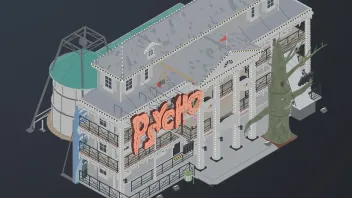
👁️👁️ New: Walk-Through Haunted House „Psycho“ 🪵
A unique, three-storey ride with elaborate Southern States theming. Two central carriages, one for the front section and one for the adventure simulation, which features three rooms: from the stretching room, through a collapsing cave, to a lift ride where things go wrong. Before that, visitors pass through a spooky obstacle course featuring animatronics and live actors.
- From Level 33
- Two versions: The Villa, Psycho
🎠 Revised: Mini kids' carousel
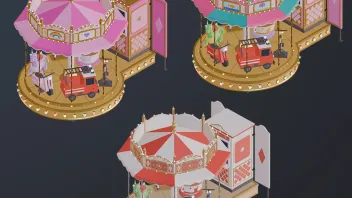
The Mini Children’s Carousel has been completely redesigned in 3D
Two new versions are now available: the Mini Fantasy Carousel and the Mini Princess Carousel.
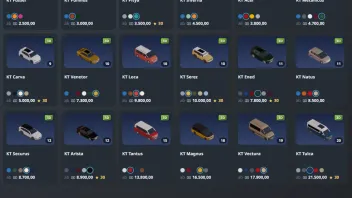
🚗🛻 Updated: All cars are now in 3D
All 18 cars (passenger cars + vans) in the vehicle market are now rendered in 3D. The 23 existing skins have been re-rendered.
- 56 new skins have been added.
- On the map, some cars have changed size: KT Fussel, KT Pumilus and KT Pitya now occupy 2 × 1 squares instead of 2 × 2, whilst the KT Tulca occupies 4 × 2 squares instead of 3 × 2.
🆕 Further improvements
- My vouchers: In the settings, you can now see which vouchers you have, which ones you’ve already redeemed, and where to redeem them. Previously, there was nowhere where you could see, for example, how many training vouchers you still had.
- Warning when setting up for a future event: Once an attraction or caravan has been set up, the dismantling cannot begin until the event is over. If your tour schedule for this business includes another event beforehand, NEXT will now warn you before you set up and ask you to confirm. This prevents you from accidentally setting up in the wrong place and missing the earlier event.
- Warning on the home screen when motivation drops: If staff motivation drops at one of your businesses, this will now appear at the very top of your next steps, highlighted in orange and showing the number of staff affected. If someone is threatening to resign, the entry turns red. One click takes you straight to the staff overview for the business.
- New notifications more visible: In NEXT, the ‘Notifications’ and ‘Messages’ tabs now display their count as a red number directly on the tab. On narrow mobile phones, the number used to be cut off, meaning an important message such as low motivation could be overlooked. Now it remains visible on any screen width.
- More slots for stored attractions: For events with automatic slot allocation, the number of slots per attraction type depends on how many attractions of that type are currently in circulation. Stored attractions were not counted in this, even if their owner had already re-submitted them. This meant there were too few slots, particularly at the start of the season: in early November for Christmas attractions that had been in storage over the summer, and in spring for all attractions that had been in storage over the winter. Now, a stored attraction counts towards the total as soon as you apply with it. Christmas attractions only count for events starting between November and February. This means that sufficient slots for Christmas attractions are made available straight away for the first Christmas markets in early November.
🪲⚒️ Bugfixes
- Unexpectedly logged out: Some players found themselves back on the login page immediately after logging in or when switching to their game world. This was caused by a tiny time discrepancy between our servers. The login system now accommodates this discrepancy and renews the session in the background, rather than logging you out.
- Shifts on the night of the time change: On the night when the clocks are turned back from summer to winter time, the hour between 2 and 3 am occurs twice. A 10-hour shift that extended into this hour was therefore deemed too long at the start of the shift and did not begin, even though it had been set up correctly. These shifts now start as planned.
- Additional staff for set-up and dismantling: If you’d selected additional staff to set up or dismantle an attraction and one of them was no longer available at the start – for example, because they’d gone to eat or sleep in the meantime – the work would start without them and take longer than planned. Now it won’t start, and the game tells you that you need to reselect your staff.
- Set-up extending beyond the start of the game: An attraction must be fully set up before the start of the game, and the game rejects any set-up that would be completed too late. However, when resuming a set-up that had already begun, this check often failed to apply. The set-up would then continue beyond the start of the game; you would still incur the contractual penalty, and although the attraction stood there fully set up, it earned nothing. Now this check applies to every construction, including those that have been resumed.
- Cancellation leads to the event: Following a cancellation, you can register for the replacement process. In NEXT, however, clicking on the cancellation took you to the tour schedule, where the event no longer appeared. Now the event opens directly, where you can register for the replacement process. Furthermore, acceptances and cancellations now display the deadline as a readable date, and the sentences in the text are once again separated by a space.
- Tapping locations on the map: On a mobile phone, the list jumps to a location when you tap it on the map of Europe. On a computer, clicking in NEXT used to do nothing. Now, a click selects the location there as well, and the map can still be moved with the mouse.
- Event list after account switch: NEXT remembers the filters for the event list. If two players shared a device, the second account would inherit the first account’s filters, including its business, and the list would no longer load (“The selected business does not belong to you.”). Saved filters now only apply to the account that set them. Due to this change, the event list will start once without your previously saved filters.
- Changing your player name without an email address: You can only change your player name once you have linked an email address. In NEXT, an unspecified error would appear instead. Now the game tells you that you need to link an email address to do this, and takes you there with a single click.
- Setting up at two events at the same venue: If your tour schedule included two events at the same venue, the game would ask which one you wanted to set up for during the set-up process. In NEXT, after paying the pitch fee for the caravan, you’d keep coming back to this question over and over again. Your selection is now retained, and you can return to the selection screen by clicking ‘Back’ from the pitch fee and pitch details pages if you wish to change your mind. The prompt also displays the location again.
- Experience below 1% now visible: In NEXT, the staff list only displayed experience once it reached a full percentage. After the first few set-ups, it therefore still showed ‘no experience yet’, even though your staff had long since learnt the ropes. Experience is now displayed to one decimal place (for example, 0.5%), and the progress bar is visible from the very first fraction.
- Empty selection fields on the iPhone: If you applied for a stored attraction in NEXT on an iPhone or iPad, the ‘Attraction’ and ‘Business’ fields appeared empty, even though something had been selected. iOS had truncated the text in the selection fields. Now, all selection fields in NEXT display what has been selected on every device. Furthermore, the blue border around a tapped selection field is no longer cut off at the sides.
- Contractual penalties involving cents: The notification regarding a contractual penalty for a missed set-up or dismantling only displayed the amount in whole talers, even though the penalty was debited down to the nearest cent. This often happened during dismantling, as outstanding operating costs are included in the calculation there. The notification now states exactly the amount that has been deducted from your account.
- Duplicate applications: With an unstable internet connection, an application could be submitted twice to the game, for example if you closed the application window, reopened it and submitted it again. You would then have two applications for the same attraction for the same event and would have paid the processing fee twice. Now, only one application per attraction and event is accepted, and the fee is deducted only once. Furthermore, whilst an application is still being processed, the ‘Submit’ button in NEXT remains disabled, even if you reopen the window.
- Unknown weather: Over the last few days, the weather was not displayed correctly for some locations. The display error has now been fixed.
- Ride to Hell ghost train: Transport routes were pointing in the wrong direction; the graphics have been corrected and replaced
- Paninis stall: The old version was still being displayed on the map; the graphic has now been replaced
That’s it - I hope you like all the improvements! 
As always, the Android app will receive the update shortly; the rollout may take a little while depending on your device.