


- Offizieller Beitrag
This patch mainly includes what are known as ‘quality of life’ improvements. The aim is to refine features to make the game more user-friendly for you in your day-to-day use. My focus this time was on the staff overview. Let’s take a look at the individual changes together:
🌟👨💻 Staff list view
The previous tile layout was nice, but with many employees in the business or on smartphones in general, clarity suffered significantly.
The tile layout remains available. But now you can simply switch the view to get a clear list.
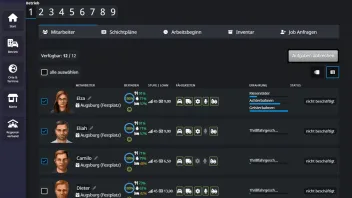
❌✅ Staff Overview: ‘Cancel Task’ mode
Previously, you could either cancel tasks individually or cancel all tasks. It became cumbersome if you wanted to cancel several, but not all, tasks.
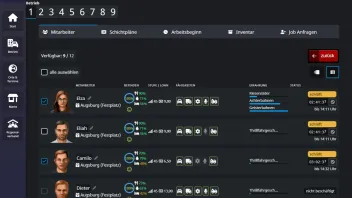
The ‘Cancel all tasks’ button has been replaced with the ‘Cancel tasks’ button. This switches the employee overview to the new mode: there, you can select as many employees as you like (or even all at once) and cancel their tasks with just one further click.
📄 Mobile view: Full and compact lists
On smartphones, there is naturally less space to display such a wide list. To improve this, we now distinguish between a full and a compact list. The full list is no longer single-line, but still takes up less space than the tiles. The compact list is single-line, but elements are hidden. Which elements are hidden depends on the width of the display; the screenshot here is just an example.
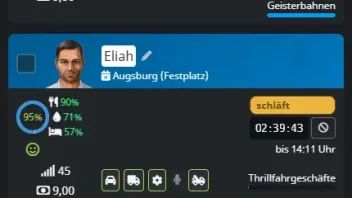
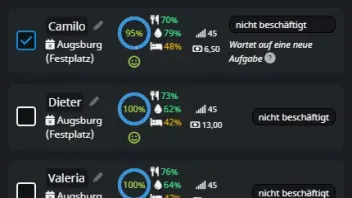
Mobile: Complete list (left), compact list (right)
🙂↕️The action bar scrolls with the page
A small but useful detail: the action bar at the bottom of the list is now ‘sticky’, meaning it remains visible at all times and scrolls with the page.
Previously, after selecting an employee, you still had to scroll all the way down to choose an action. This is no longer necessary.
💻 Job applications: New list view and ‘Reject’ mode
Just like the employee overview, job requests now also have a list view. And similar to the change regarding cancelling tasks in the overview, job applications now have a mode allowing you to reject multiple applicants with a single click. Previously, you could either reject applicants individually or all at once. This became cumbersome if you didn’t want to reject or hire certain applicants – the only option was to reject many applicants individually. With the new mode, you can now do this much faster.
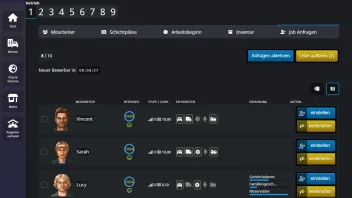
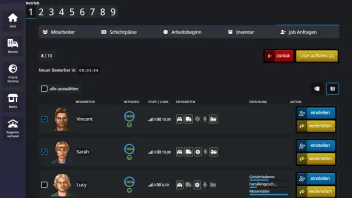
✅ Employee selection: List view and further UX improvements
Another important feature relating to employees is the selection of staff for various tasks:
- Setting up and dismantling attractions
- Setting up and dismantling caravans
- Inspections
- Maintenance
The new list view is also available here. However, the following are also new:
- Limited staff selection: If, for example, 3 staff members are required for setting up, the selection can only be confirmed if exactly 3 staff members have been selected
- All staff members in the business are now displayed (previously: only those available). If an employee is unavailable for the task, the reason is specified and, for example, a missing attribute is visually highlighted.
- No more generic error messages: Previously, the message ‘There are not enough employees available’ was often displayed as soon as you tried to start setting up or dismantling. Instead, the selection list now opens, in which the reasons are clearly marked
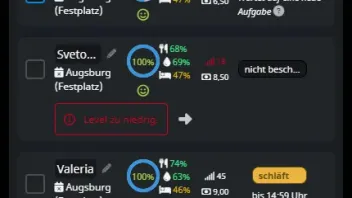
⏰ ‘Start of Work’ feature: Dedicated menu item
The ‘Start of Work’ feature has been ‘moved’. Previously, it was located at the bottom of the staff overview; now it has its own menu item.
This makes the staff overview even tidier, and for the start of work feature, it is much easier to switch between businesses to check the settings.
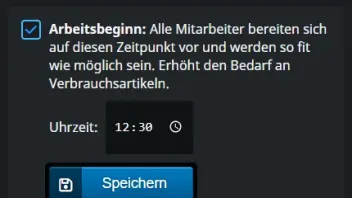
That’s it for the employee improvements. Other changes in this patch:
📱 Web App: New “Install” button
Many players are already using the handy web app, which allows you to add Funfair Tycoon to your home screen and use it on your mobile like a native app. Depending on your browser, this feature is a bit hidden. An “Install” button is therefore now displayed in the menu bar. The button is only visible if you haven’t installed the app yet and your browser supports this feature.
If you cancel the installation or click the ‘X’ to dismiss the message, the banner will no longer appear for a while; the setting is saved as a cookie.
The web app has also received minor updates:
- Improved icons for current Android systems
- Description and screenshots displayed during installation
- New background colour (dark blue)
The icon on the home screen and the background colour will be updated automatically for Android users, though this may take a few days.
iOS users will most likely need to uninstall and reinstall the web app, as Apple often does not support such updates at all.
⚙️⚡Technical improvements
- Staff overview: significantly faster loading, even with many staff members
- Cancel task: performance has also been improved here, significantly reducing loading times
🪲🔨 Bug fixes
- Tutorial: Quests would freeze if the first attraction was not a stall (winter season)
- Samsung Internet Browser: An additional dropdown was displayed in the applications process
- Attraction details view: The help text regarding the required cranes displayed incorrect information
The changes in this patch are free for all players and are not linked to a Premium Account. I hope you like the improvements. I am, of course, very keen to hear your feedback 